New Free WordPress Theme: Dark Wood
12-20-2009 written by Travis Berry

darkwoodcaplarge
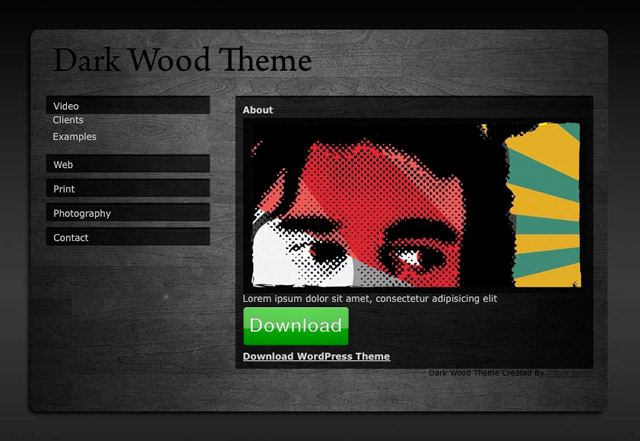
I have just released a new WordPress theme. The theme is dark and modern, perfect for a portfolio site. Theme features an accordion style menu, and slider example galleries.

Download a copy,
or visit a demo.

If you get a copy and have any questions, feel free to leave them in the comments.

And if you’re interested in a completely custom site, feel free to send me an and we can discuss your needs.

Creative Commons License
Dark Wood WordPress Theme by Travis Berry is licensed under a Creative Commons Attribution 3.0 United States License.

From README.txt
Dark Wood WordPress Theme by Travis Berry is licensed under a Creative Commons Attribution 3.0 United States License.

http://www.travisberry.com

Background wood image from:
Dark Wood Texture Pack by =cloaks

http://cloaks.deviantart.com/art/Dark-Wood-Texture-Pack-100478218

Social Icons from:

http://webtreats.mysitemyway.com/glossy-waxed-wood-social-networking-icons/

Moving Boxes Slider From:

http://css-tricks.com/moving-boxes/

This theme is available for use for personal or commercial purposes. Please consider giving a link back to http://www.travisberry.com somewhere on your site.
For questions email contact@travisberry.com
Download latest version from http://github.com/ninetwentyfour/DarkWoodTheme/archives/master
See installation.txt for install instructions

From Installation.txt
Download and install in wp-content/themes/ folder. Update header.php navigation links to match your needed pages. Update links in style.css to point to your url. Set homepage to static page. Theme is not recommended for blog use. Fixed height limits blog length.
For ease of use, create pages; video-examples, web-examples, print-examples, photography-examples, video-clients, web-clients, print-clients, photography-clients, contact, social-networks, clients
To add google analytics, insert your UA code into the script located in the footer.php
Questions email, contact@travisberry.com
Slider Usage:
To use slider copy the following into a new page. Use html view.
<div id="slider">
<img class="scrollButtons left" src="yourdomain/wp-content/themes/darkwoodtheme/images/leftarrow.png">
<div style="overflow: hidden;" class="scroll">
<div class="scrollContainer">
<div class="panel" id="panel_1">
<div class="inside">
<a href="http://www.video-parent.com/images/1.jpg"><img src="http://www.video-parent.com/images/1.jpg" alt="picture" /></a>
<p>A very shot exerpt goes here... <a href="http://flickr.com/photos/justbcuz/112479862/">more link</a></p>
</div>
</div>
<div class="panel" id="panel_2">
<div class="inside">
<a href="http://www.video-parent.com/images/2.jpg"><img src="http://www.video-parent.com/images/2.jpg" alt="picture" /></a>
<p>A very shot exerpt goes here... <a href="http://flickr.com/photos/joshuacraig/2698975899/">more link</a></p>
</div>
</div>
<div class="panel" id="panel_3">
<div class="inside">
<a href="http://www.video-parent.com/images/3.jpg"><img src="http://www.video-parent.com/images/3.jpg" alt="picture" /></a>
<p>A very shot exerpt goes here... <a href="http://flickr.com/photos/ruudvanleeuwen/468309897/">more link</a></p>
</div>
</div>
<div class="panel" id="panel_4">
<div class="inside">
<a href="http://www.video-parent.com/images/4.jpg"><img src="http://www.video-parent.com/images/4.jpg" alt="picture" /></a>
<p>A very shot exerpt goes here... <a href="http://flickr.com/photos/emikohime/294092478/">more link</a></p>
</div>
</div>
<div class="panel" id="panel_5">
<div class="inside">
<a href="http://www.video-parent.com/images/5.jpg"<img src="http://www.video-parent.com/images/5.jpg" alt="picture" /></a>
<p>A very shot exerpt goes here... <a href="http://flickr.com/photos/fensterbme/499006584/">more link</a></p>
</div>
</div>
</div>
<div id="left-shadow"></div>
<div id="right-shadow"></div>
</div>
<img class="scrollButtons right" src="yourdomain/wp-content/themes/darkwoodtheme/images/rightarrow.png">
</div>

No Comments Yet

You can be the first to comment!


Leave a comment


back to blog